
Keep patient photos out of your personal gallery
A medical photo documentation app for capturing and comparing before-and-after photos, organised by visit. Document progress, build a patient report, and share the case in one workspace.
Patient data stored in the EUApart from your personal gallery
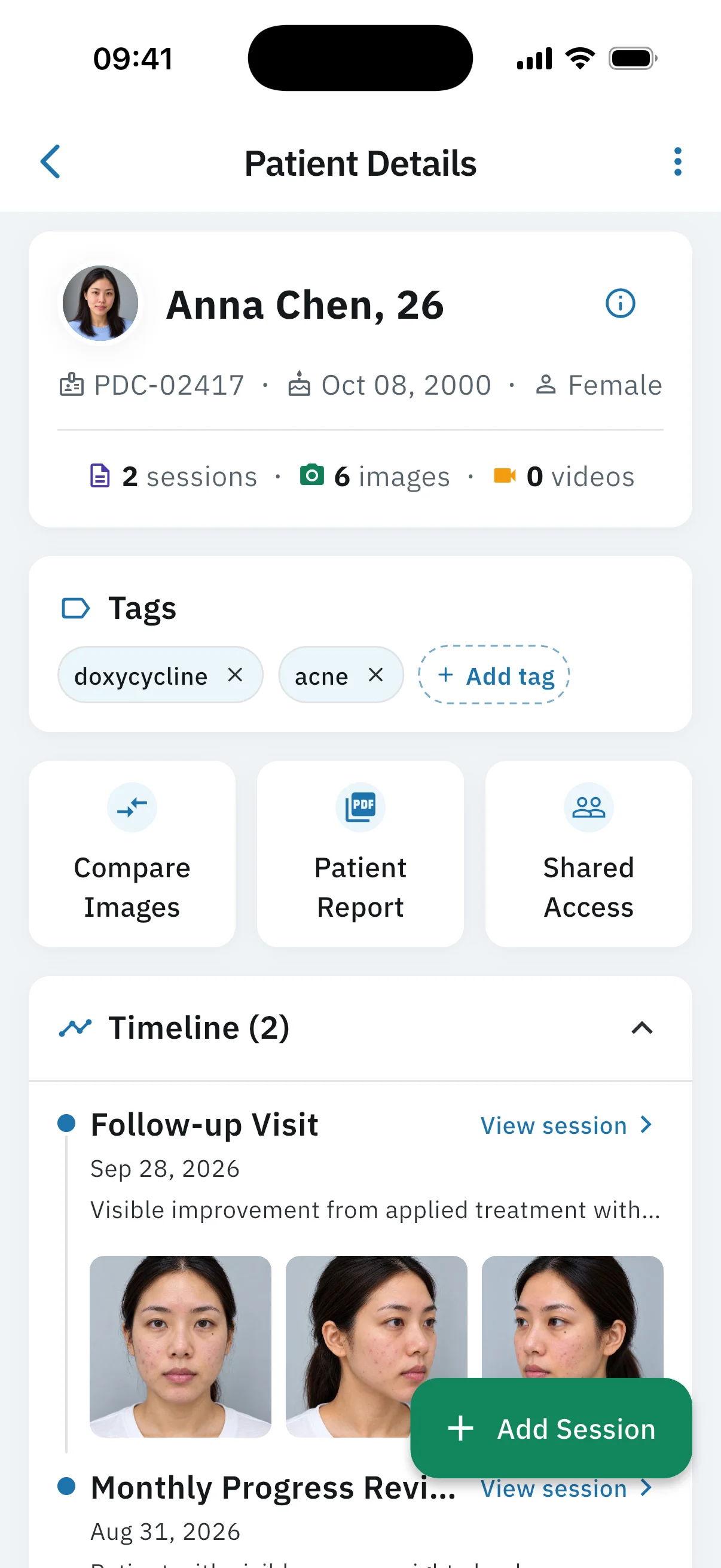
Where are my patient's photos?
Six of them are in here, from her first visit and her follow-up. The rest is your summer.
Finding them means scrolling past your own life, with Anna in the chair next to you.
PixioDoc keeps them on her patient timeline, one session per visit. Photos you take in the app stay out of your camera roll.

Anna Chen, 25
PDC-02417Oct 08, 2000Female
2sessions6images
Timeline (2)
Follow-up Visit
View sessionSep 28, 2026
Less redness on both cheeks.
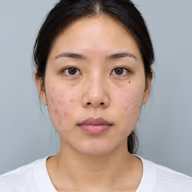


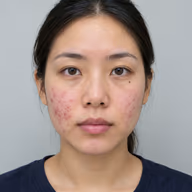
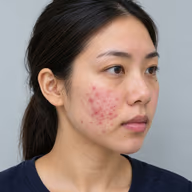
First Visit
View sessionJul 7, 2026
Active acne and redness on both cheeks.

From first photo to follow-up — one workflow
One patient, from the first photo through to a report you can share.


- 01Capture
Line up every shot with pose guidelines
Choose a pose and a line guide appears on the camera, so the patient sits in the same place each visit. To match one earlier photo, ghost overlay still lays that shot over the viewfinder.

- 02Edit
Annotate, blur, and clean up — before you save
Mark clinical detail, pixelate identifying features, and remove busy backgrounds on-device — all in the editor before the image lands in the session.

- 03Compare
Show progress patients can actually see
Slide between before and after in the consult, or switch to side-by-side, Hero, and 2×2 layouts when you need more of the story in one view. Patients forget their "before" — PixioDoc makes the difference impossible to miss.

- 04Report
Build a patient report. You choose every page.
Generate a PDF from a patient's sessions — choose which visits and images to include, then share with the patient, a referrer, or another professional.

- 05Collaborate
One patient record, contributions from your whole team
Invite a colleague to a patient with Viewer, Editor, or Admin access — so the right people can review, contribute, or manage who sees the record. Every photo lands in the same timeline, instead of scattered across texts and email threads.

One patient record, everywhere
Capture on your phone or tablet, and open the same patient record on the web.
In the consult room
Capture follow-ups on your phone with pose guidelines for a consistent angle.
Between visits
Compare before-and-afters on tablet so progress is obvious to you and the patient.
At your desk
Open the same patient record on web to review, report, and share.


Built with security and privacy at its core
Your patient photos stay private and separate from your personal gallery.
How we handle patient photos · Privacy Policy · Data Processing Agreement
Stored in the EU
Patient data is stored in the EU.
Activity history
See activity on your account and on each patient.
Biometric lock
Face ID or fingerprint unlock, plus an automatic 15-minute inactivity lock.
Privacy blur
Optional privacy blur markup before you save an image to a session.
Built for clinicians who document patient progress
Dermatologists, aesthetic clinics, plastic surgeons, wound care specialists, and orthopedic surgeons photograph progress the same way: by patient, by visit.
Open the progress slider in the consult so the patient sees the change without you scrolling your camera roll.
Dermatologists
Track skin changes across visits.
Aesthetic Medicine Clinics
Before-and-afters for botox, filler, and laser.
Plastic Surgeons
Pre-op through post-op in one timeline.
Wound Care Specialists
Healing photos, dated visit by visit.
Orthopedic Surgeons
Fracture healing and mobility over time.
Dermatologists
Track skin changes across visits.
Aesthetic Medicine Clinics
Before-and-afters for botox, filler, and laser.
Plastic Surgeons
Pre-op through post-op in one timeline.
Wound Care Specialists
Healing photos, dated visit by visit.
Orthopedic Surgeons
Fracture healing and mobility over time.
Dermatologists
Document acne, rashes, and skin changes, then compare visits with the progress slider.
Aesthetic Medicine Clinics
Track botox, filler, and laser before-and-afters with ghost overlay for a matched angle.
Plastic Surgeons
Capture pre-op and post-op before-and-afters on one patient timeline.
Wound Care Specialists
Document diabetic ulcers, surgical wounds, and pressure injuries with dated healing photos.
Orthopedic Surgeons
Document fracture healing, post-op mobility, and physical therapy progress on one timeline.
Dermatologists
Document acne, rashes, and skin changes, then compare visits with the progress slider.
Aesthetic Medicine Clinics
Track botox, filler, and laser before-and-afters with ghost overlay for a matched angle.
Plastic Surgeons
Capture pre-op and post-op before-and-afters on one patient timeline.
Wound Care Specialists
Document diabetic ulcers, surgical wounds, and pressure injuries with dated healing photos.
Orthopedic Surgeons
Document fracture healing, post-op mobility, and physical therapy progress on one timeline.
Plastic Surgeons
Capture pre-op and post-op before-and-afters on one patient timeline.
Wound Care Specialists
Document diabetic ulcers, surgical wounds, and pressure injuries with dated healing photos.
Orthopedic Surgeons
Document fracture healing, post-op mobility, and physical therapy progress on one timeline.
Dermatologists
Document acne, rashes, and skin changes, then compare visits with the progress slider.
Aesthetic Medicine Clinics
Track botox, filler, and laser before-and-afters with ghost overlay for a matched angle.
Plastic Surgeons
Capture pre-op and post-op before-and-afters on one patient timeline.
Wound Care Specialists
Document diabetic ulcers, surgical wounds, and pressure injuries with dated healing photos.
Orthopedic Surgeons
Document fracture healing, post-op mobility, and physical therapy progress on one timeline.
Dermatologists
Document acne, rashes, and skin changes, then compare visits with the progress slider.
Aesthetic Medicine Clinics
Track botox, filler, and laser before-and-afters with ghost overlay for a matched angle.
Trusted by hundreds of professionals in 20+ countries
From Brazil to Australia, clinicians use PixioDoc to document patient progress. Wherever they work, patient data is stored in the EU, with photos kept apart from their personal gallery.
See what each plan includes
Free covers everyday documentation. Pro adds reports, sharing, background removal, and the web app. Teams is for practices of 4 or more.
- Up to 10 Patients (5 sessions each)
- Patient Tags, Status Labels & Session Drafts
- Photo & Video Capture with Editing
- Progress Slider Comparison
Pro adds patient PDF reports, sharing with colleagues, background removal, and the web app.
€84,99 billed per year
- Unlimited Patients
- Patient Tags, Status Labels & Session Drafts
- Photo & Video Capture with Editing
- Side-by-Side Comparison
- Multi-Image Comparison Layouts
- Background Removal
- Practice logo and name on patient PDF reports
- Sharing & Collaboration
- Web App Access (Desktop & Mobile)
- Support via Email
Custom
Built around seats, setup, and team workflow needs.
Same features as Pro, with centralized billing and team onboarding for practices of 4+.
- All Pro Features Included
- Shared Patient Access Across Your Team
- Centralized Billing for 4+ Seats
- Priority Support
- Quick 5-Minute Setup & Onboarding
For teams of 4+ - quick setup after approval
Prices are for reference only and may vary by country.
Frequently Asked Questions
Get instant answers to the most common questions about PixioDoc, your account, and our features.
General & Usage
Security & Sharing
Pricing & Account
Still have questions?
Our support team is ready to help you with any specific inquiries.
Contact supportYour next patient visit could be the first one in PixioDoc
Download the app and document the next visit in its own workspace.
Working with a team of 4+? Get a Teams proposal.
